
How To Withdraw Money With UPI On Sikkim Game

Fast Reply
A Sikkim Game UPI withdrawal takes four things: a saved UPI ID, a total bet requirement brought down to zero, an amount between ₹110 and ₹50,000, and your login password to confirm. You tap Wallet, then Withdraw, pick the UPI tab and send the request. UPI allows 2 withdrawals per day, and the window runs 00:00-23:59.
Weeks before a withdrawal fails, the cause is often already in place: a payout name entered in haste or a UPI ID with a typo. A correct first setup spares you plenty of hassle later. This page covers it step by step, beginning with the checks to make before you tap Withdraw.
- Minimum Withdrawal
- ₹110
- Maximum Per Request
- ₹50,000
- UPI Withdrawals Daily
- 2 per day
- Withdrawal Hours
- 00:00-23:59
- Before Withdrawing
- Total bet at zero
- Confirm With
- Your login password
Topics Covered Here
What You Need Before A Sikkim Game UPI Withdrawal
You need an active account, a balance of at least ₹110, a UPI ID saved under Add UPI, and no betting requirement left on your balance. If any one of these is missing, the Withdraw button will not go through, or the request will stall.
If you have not opened an account yet, register with your phone number or email and enter the invite code 532312088217 in the Invite Code field. The field is required, so the form will not submit without it. The steps are covered in creating a Sikkim Game account with an invite code.
Your login password matters more than new players expect. You type it to confirm every withdrawal, so a forgotten password blocks your money until customer service resets it.
- An account you can log in to with your phone number or email
- A withdrawable balance of ₹110 or more
- A UPI ID saved under Add UPI, in your real name
- Your total bet requirement brought down to zero
- Your login password, which confirms every request
Player Note: Write your login password somewhere safe offline before your first withdrawal, because the login page sends forgotten-password cases to customer service.
How To Add UPI ID On Sikkim Game
To add your UPI ID, open Wallet, tap Withdraw, choose the UPI tab and tap Add UPI. The form asks for four things: UPI Name, Phone Number, UPI ID and Confirm UPI ID. Fill them in and tap Save.
The Confirm UPI ID box is there for a reason. One wrong letter in a UPI ID can send money to a stranger or get the transfer bounced. Copy the ID straight from your UPI app's profile screen instead of typing it from memory.
- Log in and tap the Wallet icon at the bottom
- Tap Withdraw, then select the UPI tab
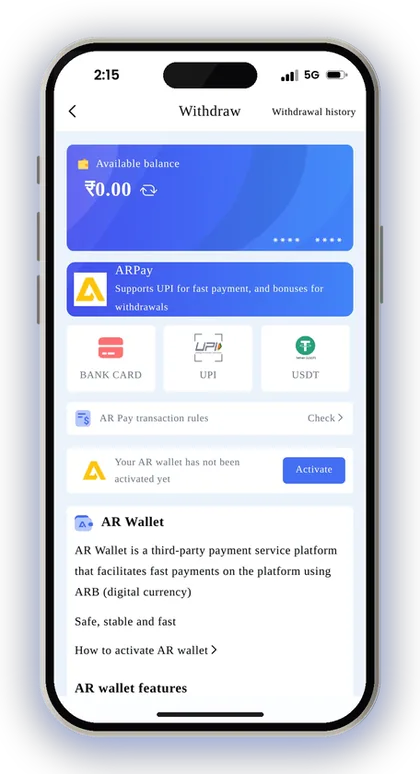
- Tap Add UPI
- Type your real name in UPI Name
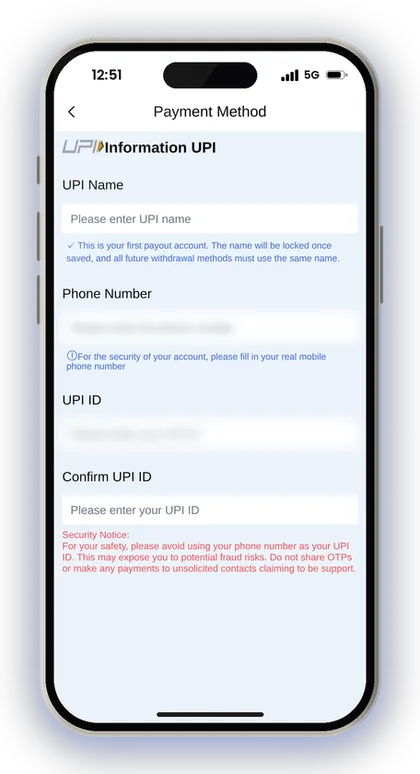
- Enter your real mobile number in Phone Number
- Enter your UPI ID, then type it again in Confirm UPI ID
- Tap Save and check that the ID now shows on the UPI tab
Which Name Should You Enter As UPI Name?
Type your full legal name just as your bank and UPI app have it on record. After the first payout account is saved, the app fixes this name, so any other withdrawal method you add afterwards must show the identical name.
New players often type a nickname or a short first name. That name then follows the account forever and has to match your bank, UPI and USDT details later. Check the spelling, including the middle name and surname order, before you tap Save.
Why Your Phone Number Should Not Be Your UPI ID
By default, a lot of UPI apps generate an ID in the form yournumber@bank, and the app's security notice advises against using it. Anyone who sees a UPI ID based on your phone number can use it to call or message you, which scammers take advantage of.
In most UPI apps you can add another ID that uses a name or a word rather than digits. Create one, connect it to the same bank account, and save that ID here. The Phone Number field is a separate matter and must still hold your actual mobile number.
Do Not Share OTPs With Anyone Claiming To Be Support
Never share an OTP, and never pay anyone who contacts you first saying they are support. The Add UPI screen gives this warning directly. A real withdrawal never needs you to send money or read out a code.
A common scam works like this: your request is pending, a stranger on Telegram says they can push it through for a fee, and the fee is gone. Raise problems only through the in-app Customer Service option.
Player Note: Open your UPI app and check the name it shows for your ID before saving; if the bank name and app name differ, use the bank's version.
The Locked Payout Name Rule
Your first payout account locks your name. When you save that first account, the name cannot be edited, and every later method, whether UPI, bank card or USDT, must carry the same name.
This rule protects you as well as the platform. If someone gets into your account, they cannot add their own bank account under another name and drain the balance.
The downside is that a typo is permanent. If you already saved a wrong name, do not create a second account to fix it. Contact customer service with your correct details, since the app says incorrect registered information goes through them.
Getting Your Total Bet Down To Zero First
Before you can withdraw, the beginner's guide says your total bet must be at zero. In practice this means the amount you still have to bet against your deposits and bonuses has to be used up first.
Say you add ₹500 and receive a deposit bonus on top. Until you have placed enough bets to clear the requirement, that balance stays locked for play. Players who deposit and try to withdraw straight away hit this wall most often.
How To Check How Much You Still Need To Bet
Open the withdraw screen and look at the amount still needed before you request anything. The figure drops as you play, and your game history under Account shows what you have already bet.
Do not raise bet sizes just to clear the number quickly. Results in Win Go, K3 and slots are random, so a rushed run of big bets can wipe out the balance you were trying to withdraw. Clear it at the stake you would normally play.
Do Deposit Bonuses Add To The Betting Requirement?
Bonuses usually carry their own betting condition, so taking one can raise the amount you must bet before withdrawing. The UPI deposit tile shows a 3% bonus, for example, and Top-Up Coupons have a spending threshold and validity period.
If you plan to withdraw soon, think before stacking several offers at once. A small bonus is not worth much if it keeps your money locked for days. Read each offer's rules on the Activity page first.
How To Withdraw To UPI On Sikkim Game, Step By Step
To withdraw to UPI on Sikkim Game, tap Wallet, then Withdraw, choose the UPI tab, enter the amount and confirm with your login password. The whole request takes about a minute once your UPI ID is saved.
The steps are the same in the Sikkim Game app and the mobile website. What matters is that you log in to the account that holds your balance and saved UPI ID, not a second one.
- Log in and tap the Wallet icon
- Tap the Withdraw button
- Select the UPI tab and check your saved UPI ID
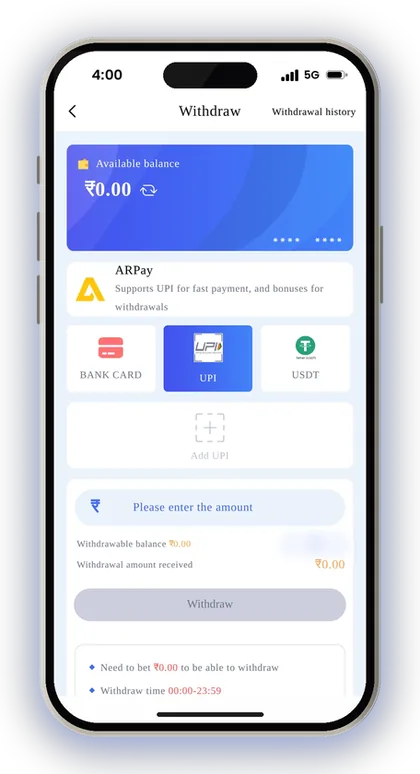
- Confirm your total bet requirement shows zero
- Enter an amount between ₹110 and ₹50,000
- Enter your login password
- Submit the request and check Withdrawal history
Player Note: Take a screenshot of the request in Withdrawal history right after submitting; it gives customer service a clear record if anything goes wrong.
Sikkim Game UPI Withdrawal Limits
UPI withdrawals on Sikkim Game run from ₹110 to ₹50,000 per request, with 2 requests per day, any time between 00:00 and 23:59. The screen shows your remaining requests for the day, so check that count before you send one.
Two requests a day means planning helps. If you have ₹70,000 to withdraw, one UPI request of ₹50,000 and a second of ₹20,000 uses up your whole day's allowance. The full rules for every method are on the Sikkim Game withdrawal limits page.
| Method | Minimum | Maximum | Per Day | Hours |
|---|---|---|---|---|
| UPI | ₹110 | ₹50,000 | 2 | 00:00-23:59 |
| Bank Card | ₹110 | ₹200,000 | 3 | 00:00-23:59 |
| USDT | ₹1,030 | ₹1,000,000 | Check the app | 00:00-23:59 |
UPI Vs Bank Card Withdrawal
Bank card has a higher ceiling of ₹200,000 per request and allows 3 requests a day, against UPI's ₹50,000 and 2. The minimum is ₹110 for both, and both accept requests around the clock.
For everyday amounts UPI is simpler, since you only need an ID. For a large balance, a bank card saves requests. Remember that your locked payout name applies here too, so the bank account must be in the same name.
When Does USDT Make More Sense?
USDT suits much larger amounts: its range is ₹1,030 to ₹1,000,000, and the money arrives after three confirmations on the blockchain main network. You need a TRC address saved under Add USDT address.
For most players taking out a few thousand rupees, UPI is the easier choice. If you already fund your account with crypto, see how a USDT TRC20 deposit works so your deposits and withdrawals use the same wallet.
Player Note: Avoid splitting a small balance into two tiny UPI requests; you may need the second request later the same day.
What To Do If Your UPI Withdrawal Is Delayed
Check Withdrawal history first. It shows whether the request is still pending, completed or rejected, and that tells you what to do next.
The platform does not show a fixed arrival time for UPI, so a short wait is normal. If the history says completed but nothing reached your bank, check your UPI app's transaction list and your bank SMS before assuming money is lost.
Why A UPI Withdrawal Gets Rejected
Most rejections trace back to one of three things: a wrong or inactive UPI ID, a name that does not match your bank account, or a betting requirement that was not fully cleared. A rejected amount normally returns to your balance, so check your Wallet.
Fix the cause before trying again, or the second request may fail the same way and use up your last request for the day. If the name itself is the problem, only customer service can correct it.
How To Contact Support About A Withdrawal
Use the 24/7 Customer Service option inside the app, and send your account ID, the withdrawal amount, the time, and a screenshot of the history entry. Clear details get a faster answer than a vague message.
More options are on the Sikkim Game customer care page. Be careful with Telegram groups offering to speed up payments, and never pay anyone a release fee.
Common UPI Withdrawal Mistakes New Players Make
Most problems are avoidable. The same few mistakes come up again and again, and each one costs either time or money.
Your deposits count too. The deposit page cautions that the amount you transfer has to be the same as the order you placed. If a mismatched deposit never gets credited, there is nothing for you to withdraw, so go through the Sikkim Game deposit by UPI rules as well.
- Saving a nickname as the payout name, which then locks
- Using a phone-number UPI ID despite the security notice
- Requesting a withdrawal before the total bet reaches zero
- Using both daily UPI requests on small amounts early in the day
- Forgetting the login password needed to confirm
- Trusting a Sikkim Game Hack or predictor app, which is a scam and can steal your login details
- Opening a second account instead of contacting support
Playing Safely With Real Money
Only people aged above 18 years should use Sikkim Game, and the platform itself warns that gambling can become addictive. Real-money gaming laws are not the same in every Indian state, so please confirm what your own state permits before you start playing.
Decide how much you will spend on play before you deposit anything, and take out your winnings often instead of leaving them in the account to fund further rounds. Outcomes are random, so consider every deposited amount as money you can afford to lose. You can find more practical tips on the Sikkim Game blog.
Player Note: If you find yourself chasing losses, stop for the day; withdraw what is left of your balance rather than trying to win it back.
Got Questions? Read Here
What is the minimum UPI withdrawal on Sikkim Game?
The minimum is ₹110 per request. The maximum for one UPI request is ₹50,000.
How many times a day can I withdraw by UPI?
UPI permits 2 withdrawals a day, and the withdraw screen displays how many remain for that day. Should you need more, a bank card permits 3 a day.
Can I change my payout name after saving it?
No. The name on your first payout account locks once saved, and every later method must use it. If it was entered wrongly, contact customer service.
Why can't I withdraw even though I have a balance?
Your total bet requirement probably has not reached zero yet. Keep playing at your normal stake until it clears. Also check that the amount is at least ₹110.
Can I use my phone number as my UPI ID?
The app advises against it, because it exposes you to fraud. Create a separate UPI ID in your UPI app and save that one instead.
What hours can I request a UPI withdrawal?
Requests are accepted from 00:00 to 23:59, so any time of day. The daily limit of 2 requests still applies.
Do I need an invite code to register before withdrawing?
Yes, the Invite Code field is required on the register page. Enter 532312088217 when you sign up.
What if I forget my login password?
Every withdrawal needs your login password. If you forget it, contact customer service right away to get it reset.
Next Pages To Open
Sikkim Game withdrawal steps for UPI, bank card and USDT, with the ₹110 minimum, daily limits, the betting rule and fixes for stuck or rejected requests.

Sikkim Game deposit steps for UPI, USDT and ARPay, the ₹100 minimum, deposit bonus rates, and how to fix a recharge that does not show in your balance.

Sikkim Game customer care is open 24/7 inside the app. Learn where to find it, what details to send, and how to fix deposit, withdrawal and login issues.

Sikkim Game USDT deposit made simple: pick a channel, meet the 10 USDT minimum, copy the TRC address, paste the hash and get the 2% extra bonus.
Ready To Play On Sikkim Game?
Register on Sikkim Game in a minute and explore the games and offers.