
Sikkim Game Withdrawal: How To Withdraw Money To UPI, Bank Or USDT
Fast Reply
A Sikkim Game withdrawal sends money from your main wallet to your own bank account, UPI ID, USDT address or AR Wallet. You open Wallet, tap Withdraw, pick a method, enter the amount and confirm with your login password. UPI and bank card requests start at ₹110, and the withdrawal window is open around the clock.
Most failed requests come down to three things: a betting requirement that is not finished, a name that does not match the saved account, or a wrong IFSC code or UPI ID. All three are easy to avoid if you set up your withdrawal details calmly before your first win, not in a rush after it.
UPI is the simplest choice for everyday amounts up to ₹50,000, bank card handles bigger rupee amounts, and USDT goes up to ₹1,000,000 per request for players who already use crypto wallets.
- Minimum Withdrawal
- ₹110 (UPI and bank)
- USDT Minimum
- ₹1,030
- Maximum Per Request
- Up to ₹1,000,000 (USDT)
- Withdrawal Hours
- 00:00-23:59 every day
- Daily Requests
- 2 UPI, 3 bank card
- Payment Methods
- UPI, Bank Card, USDT, ARPay
Topics Covered Here
How To Withdraw Money From Sikkim Game?
To withdraw money on Sikkim Game, tap Wallet in the bottom menu and then tap Withdraw. The same Withdraw button sits on the Account page and at the top of every lottery screen, including Win Go, K3 and 5D, so you can request money without hunting through menus.
First log in to your account with the phone number or email you registered with. If no bank account, UPI ID or USDT address is saved yet, the method screen asks you to add one before anything else. Do that once, and every later request is just the amount and your password.
Say you win ₹2,400 in a WinGo 3Min round. Wait for any open bets to settle before you withdraw, because money sitting in an unfinished period is not yet part of your free balance. Then follow the steps below.
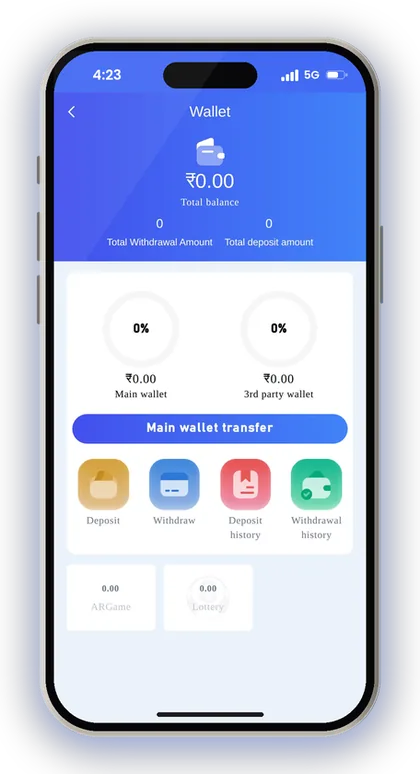
- Log in and tap Wallet at the bottom of the app.
- Tap Withdraw.
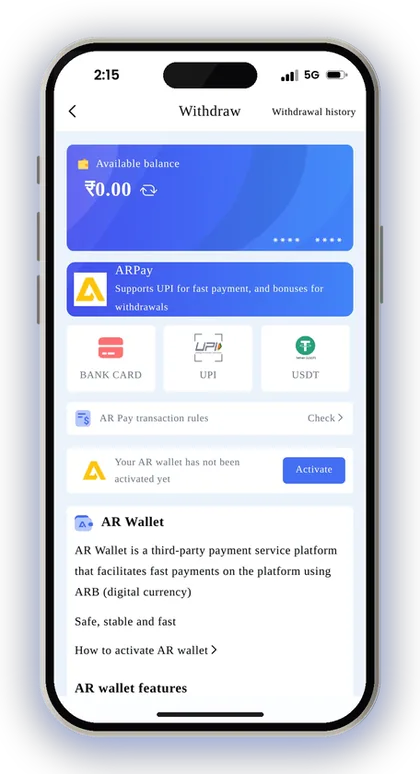
- Choose ARPay, BANK CARD, UPI or USDT at the top of the screen.
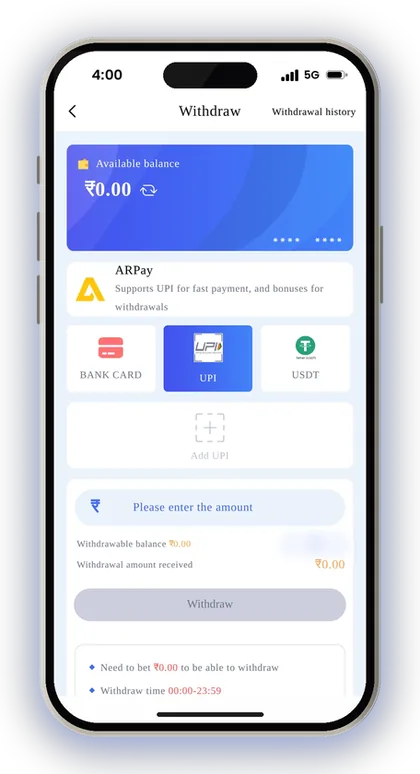
- Select your saved account, or add a new bank account, UPI ID or USDT address.
- Check that your remaining betting requirement shows zero.
- Enter an amount inside the range shown on that method's screen.
- Enter your login password and confirm the request.
- Follow the status under Withdrawal history.
Player Note: Take a screenshot of each request in Withdrawal history; if anything goes wrong, those order details let support trace it much faster.
Sikkim Game Withdrawal Limit, Minimum Amount And Daily Requests
The Sikkim Game minimum withdrawal is ₹110 for both UPI and bank card, and ₹1,030 for USDT. The most you can take out in one request is ₹50,000 by UPI, ₹200,000 by bank card and ₹1,000,000 by USDT.
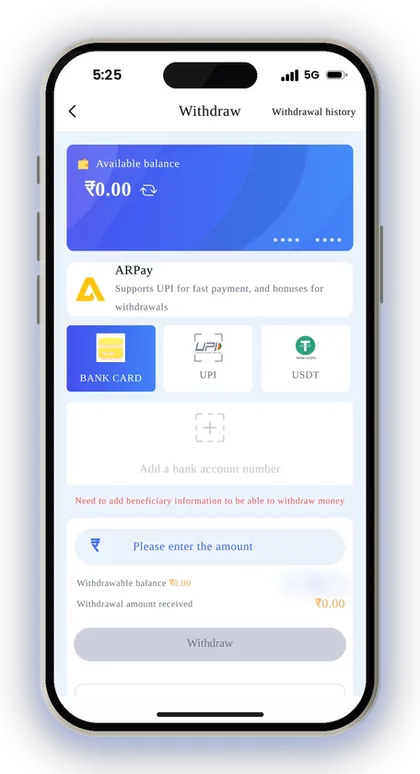
Every method shows a withdrawal time of 00:00-23:59, so there is no night-time cut-off on the app's side. The number that catches people out is the daily request count. The screen shows how many requests you have left today, and once that hits zero you wait for the next day.
For ARPay, the limits depend on your AR Wallet. Open the ARPay tab and read the AR Pay transaction rules before you move a large amount through it.
| Method | Minimum | Maximum Per Request | Requests Per Day | Withdraw Time |
|---|---|---|---|---|
| UPI | ₹110 | ₹50,000 | 2 | 00:00-23:59 |
| Bank Card | ₹110 | ₹200,000 | 3 | 00:00-23:59 |
| USDT | ₹1,030 | ₹1,000,000 | 3 | 00:00-23:59 |
| ARPay | Check the ARPay tab | Check the ARPay tab | Check the ARPay tab | Check the ARPay tab |
Why Can You Withdraw Only Twice A Day By UPI?
UPI gives you two withdrawal requests per day, against three for bank card. That is enough for most players, but only if you do not waste them on small amounts.
A common mistake is withdrawing ₹500 in the morning to test the method, then winning ₹8,000 at night and finding only one request left. Test with your first win if you like, but after that, collect your balance and withdraw it in one request instead of several small ones.
How To Move A Large Amount In One Day
For anything above ₹50,000, use bank card, which accepts up to ₹200,000 per request and three requests a day. USDT goes higher still, up to ₹1,000,000 per request.
Remember that your own bank also has limits on what it accepts in a day, and some banks flag sudden large credits for review. If you plan to withdraw several lakh, splitting it across two days is often smoother than forcing everything through at once.
Player Note: If your balance is just under ₹110, leave it for your next session rather than placing a risky bet only to reach the minimum.
What You Need Before Your First Withdrawal
A request goes through only when four things are ready: an account you can log in to, a cleared betting requirement, a saved withdrawal account in your own name, and money in the main wallet. Miss one and the request either will not submit or gets rejected.
Still at the setup stage? register on Sikkim Game using the mobile number you really use, and type 532312088217 into the Invite Code box, as the sign-up form won't proceed without one. Using a genuine number pays off later too, because the UPI form asks for your actual phone number as well.
The Wallet page shows your Main wallet and 3rd party wallet separately. After you play slots or live casino from outside providers, part of your balance can stay in the 3rd party wallet. Tap Main wallet transfer to bring it back before you withdraw, otherwise the Withdraw screen shows less than you expect.
- An account you can log in to with your phone number or email and password
- Remaining betting requirement showing zero
- A bank account, UPI ID or TRC USDT address saved under Withdraw
- The same full name on every withdrawal method
- Your balance in the Main wallet, not the 3rd party wallet
- Your login password, which confirms every request
What Does Total Bet Until Zero Mean?
Before you withdraw, the betting amount still due on your account must show zero. Apps like this usually connect that amount to your deposits, so money you add has to be played through at least once before it can leave as a withdrawal.
New players often deposit ₹500, play for ten minutes, win ₹200 and then wonder why the request will not go through. Check the remaining amount on the Withdraw screen first. Bonuses and Top-Up Coupons come with their own conditions, so read the Sikkim Game bonus terms before you claim one if you want to withdraw quickly.
Why The Account Name Gets Locked After Saving
Once you save the name on your first withdrawal account, it can't be changed. Any other withdrawal method you add afterwards, be it UPI or a different bank, has to carry the same name.
That is why using a brother's or friend's account is a mistake. If your first saved name belongs to someone else, your own UPI or bank account will not match it later. Type your full name exactly as it appears in your bank records, including the middle name if your bank uses one.
How To Add A Bank Account For Withdrawal
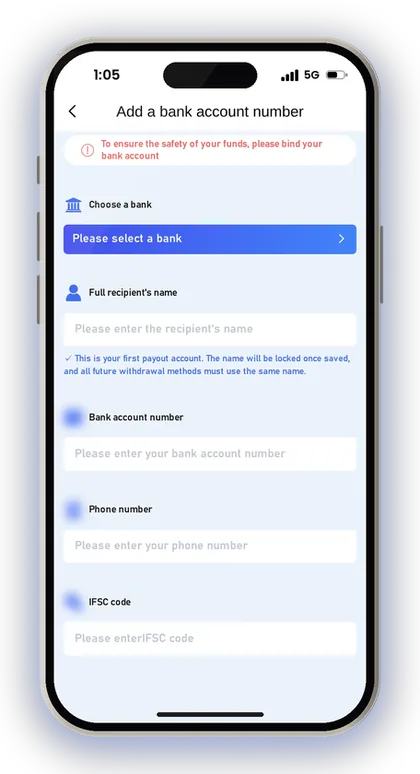
On the Withdraw screen, tap BANK CARD and choose Add a bank account number. Before a bank withdrawal is allowed, the app wants these beneficiary details, and it asks you to bind the account as a safeguard for your money.
The platform states plainly that it will not compensate you if money goes astray because of incorrect bank details, so any mistake in typing falls on you. Avoid entering them from memory. Instead, copy the account number and IFSC code directly from your passbook or your banking app.
If you have already saved wrong details, do not try to add a second account under a different name. Contact customer service to get the record corrected, which is what the withdrawal screen itself advises.
- Tap BANK CARD, then Add a bank account number.
- Choose your bank from the list.
- Enter the full recipient's name exactly as your bank shows it.
- Enter your bank account number.
- Enter your phone number.
- Enter the IFSC code of your branch.
- Check every field once more and tap Save.
Player Note: An IFSC code has 11 characters and the fifth one is always zero; if yours looks different, recheck it before you tap Save.
How To Bind UPI For Withdrawals
Tap UPI on the Withdraw screen, then Add UPI, and fill in your UPI name, phone number and your UPI ID twice. Once saved, it shows up as a choice every time you withdraw by UPI.
The Confirm UPI ID field is there for a reason. One wrong letter can make the transfer fail or send it to a different handle, so copy the ID straight from the profile section of your UPI app.
- Tap UPI on the Withdraw screen, then Add UPI.
- Enter your UPI Name, the same name already locked on your account.
- Enter your real mobile phone number.
- Enter your UPI ID.
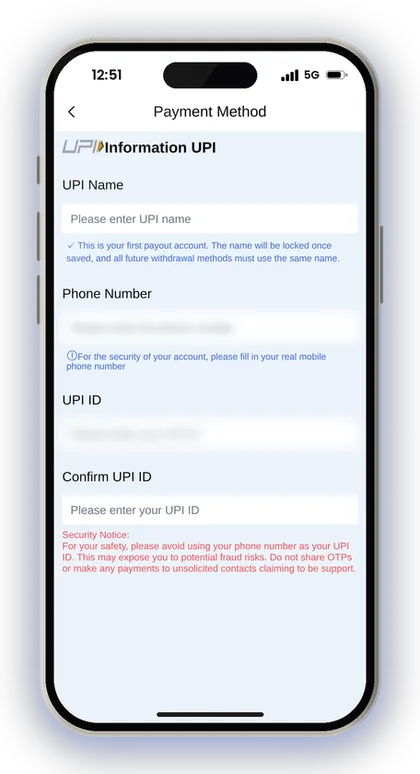
- Type the same UPI ID again in Confirm UPI ID.
- Tap Save.
Should You Use Your Phone Number As Your UPI ID?
No. The app carries a security notice that tells you not to use your phone number as your UPI ID, because that can expose you to fraud.
A number-based ID tells anyone who sees it your mobile number too, which scammers use for fake support calls. Most UPI apps let you create a second ID based on your name or a custom word. Make one of those and save it here instead.
Which UPI App Can You Use For Withdrawals?
Any UPI ID linked to your own bank account works, whether it comes from PhonePe, Google Pay, Paytm or your bank's app. The money lands in the bank account behind that ID.
What matters is the name. The UPI name you save must match the locked name on your account. If your UPI ID is linked to a joint or family account under another name, use a different ID linked to an account in your own name.
How To Withdraw Your Balance In USDT
USDT withdrawals go to a wallet address on the TRC network, which you save once under Add address. After that, you choose the amount of USDT on the withdrawal screen, confirm with your password, and the request is sent.
After you withdraw, the blockchain main network has to confirm the transfer 3 times before it reaches your wallet. That happens on the blockchain, so the app cannot speed it up once the request is processed.
- Tap USDT on the Withdraw screen, then Add address.
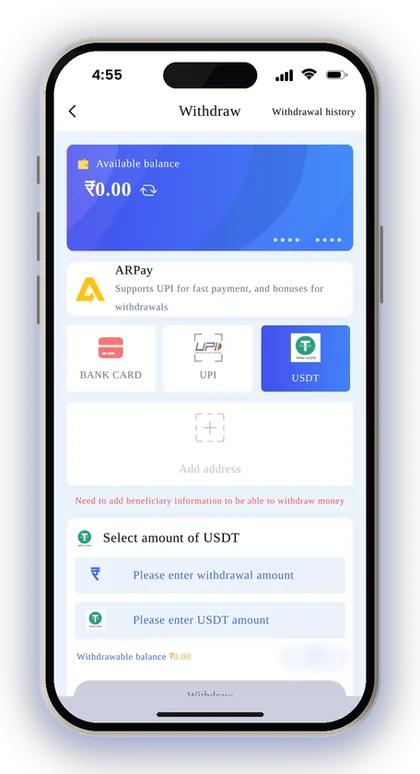
- Select TRC as the main network.
- Paste your USDT address.
- Give it an address alias you will recognise, such as the name of your wallet app.
- Tap Save and return to the USDT tab.
- Select the amount of USDT, tap Withdraw and enter your login password.
What If You Paste An Address From The Wrong Network?
Only save a TRC address, because that is the main network the app offers. A crypto transfer sent to the wrong address cannot be reversed by anyone, not by the platform and not by your wallet provider.
Copy the address directly from the receive screen of your wallet and make sure it is the TRC-20 USDT address, not another coin or network. After pasting, check the first and last four characters against your wallet. That check takes ten seconds and prevents the one mistake that cannot be fixed.
Is USDT Worth It Over UPI?
USDT makes sense if you withdraw large amounts or already hold crypto, because its ceiling is far higher than UPI's. Your bank never sees the transfer from the app, which some players prefer.
The trade-off is the extra step. You still have to sell USDT for rupees somewhere, with that service's own fees and rates, and crypto rules in India can change. For everyday amounts like ₹1,000 or ₹5,000, UPI or bank card is simpler.
Player Note: Send your first USDT withdrawal close to the minimum to confirm the address works before you move a bigger amount.
What Is An ARPay Withdrawal Through AR Wallet?
Withdrawals through ARPay are credited to AR Wallet, an outside payment service that runs on a digital currency named ARB. You must activate AR Wallet before using it. Until you do, the ARPay tab shows that your wallet is inactive, along with an Activate button.
When your balance is in AR Wallet, you can sell ARB there through UPI and receive rupees, and the platform says this earns you additional rewards. The Activity page also has an AR Wallet Buy & Sell ARB 5% Bonus, and deposits made through ARPay come with a separate bonus as well.
The idea is that your bank never deals with the gaming platform directly, so you worry less about bank limits or flagged transfers. The downside is that your money passes through one more app. Tap Check next to AR Pay transaction rules and read them before you use it for a large amount.
Player Note: ARPay is worth trying if direct bank or UPI withdrawals keep failing on your account; otherwise UPI and bank card have fewer steps.
UPI Vs Bank Card Vs USDT: Which Withdrawal Method Should You Use?
For most players in India, UPI is the right default for amounts up to ₹50,000, and bank card is the better choice above that. USDT and ARPay suit players who already use crypto or digital wallets and are comfortable with the extra step.
You can save more than one method, as long as every one of them uses your locked name. Having UPI and a bank account both ready gives you a backup if one channel has a problem on a given day, and it gives you more requests in total.
| Method | Good For | Watch Out For |
|---|---|---|
| UPI | Small and medium amounts, quick setup | Only 2 requests a day, ₹50,000 cap |
| Bank Card | Larger rupee amounts, 3 requests a day | Wrong IFSC or account number |
| USDT | Very large amounts, crypto users | Wrong network address, selling USDT later |
| ARPay | Avoiding direct bank transfers | Activation and an extra app to manage |
Player Note: Save both a UPI ID and a bank account under the same name, so a failed request on one method does not leave you stuck.
Sikkim Game Withdrawal Not Received? Common Problems And Fixes
When money does not arrive, first open Withdrawal history in your Wallet, or My withdraw history on the Account page, and read the status of the request. That tells you whether the problem is on the app's side, your details, or your bank.
Keep the order details ready before you reach out to Sikkim Game customer care. The 24/7 Customer service option is on the homepage and the Account page, and a request with an order number and a screenshot gets checked far faster than "my money did not come".
What To Do If Your Withdrawal Is Still Pending
A pending request means it has not been completed yet, so do not submit the same amount again. A second request uses up one of your daily requests and can confuse the record if both go through.
Check whether your bank or UPI app is having trouble that day, as bank servers can delay credits even after the app has sent the money. If the status stays the same for a long time, contact support with the order number instead of waiting for days.
Withdrawal Rejected Because Of Wrong Details
Most failed requests come down to a wrong account number, IFSC or UPI ID. The app cautions that it isn't responsible for losses from incorrect bank information, so correct the error quickly.
Do not add a new account under a different name to get around the problem, because the locked name blocks that. Contact customer service, explain which detail is wrong, and ask them to correct the saved account before you try again.
Why The Withdraw Button Will Not Take Your Request
Usually one of four things is the cause: the betting requirement is not yet zero, the amount is below the minimum for that method, you have used up today's requests, or your money is still in the 3rd party wallet.
Check them in that order. Most players find the answer in the first one, after a fresh deposit added to the amount they still need to bet. Moving money back with Main wallet transfer fixes the last one in seconds.
Forgot The Login Password Needed To Withdraw?
Every withdrawal asks for your login password, so if you have forgotten it, contact customer service, as the app tells you to. The Forgot password? link on the Sikkim Game login page points you the same way.
Once you are back in, change it to a strong password under Settings, then Login Password. Do not reuse your UPI PIN or bank password here, since anyone who learns one of them would then know both.
How To Keep Your Withdrawals Safe
Your withdrawal is only as safe as your login password and your saved account details. Anyone who gets into your account could try to change where your money goes, so a strong password and a private UPI ID matter more than any setting in the app.
Gambling can become addictive, and the platform only accepts players above 18. Decide on a withdrawal target before you play, for example taking out anything above your starting ₹1,000, and withdraw it as soon as you reach it. Results in Win Go, K3 and slots are random, so money left in the balance is money still at risk.
Is There A Sikkim Game Hack For Faster Withdrawals?
No. There is no Sikkim Game hack, predictor or paid tool that speeds up withdrawals or predicts results. Telegram channels and apps that sell these are scams built to take your money or your login details.
A common trick is a channel that asks you to deposit through their link or pay a fee to "release" your withdrawal. Withdrawals happen only inside the Sikkim Game app, through the Withdraw button, and never require paying someone outside it.
Never Share OTPs With Anyone Claiming To Be Support
Real support staff never ask for your OTP, UPI PIN or bank password to complete a withdrawal. The security notice in the app warns you not to share OTPs or send money to unfamiliar contacts who say they are from support.
If someone calls or messages you first about a stuck withdrawal, treat it as a scam. Open customer service from inside the app yourself, and never install screen-sharing apps at a stranger's request.
Player Note: Withdraw your winnings regularly instead of letting a big balance build up; a smaller balance means less to lose if your account is ever misused.
Got Questions? Read Here
What is the minimum withdrawal on Sikkim Game?
The minimum is ₹110 for UPI and bank card withdrawals. USDT withdrawals start at ₹1,030. For ARPay, check the AR Pay transaction rules on the ARPay tab.
How many times can I withdraw in a day?
UPI allows 2 requests per day and bank card allows 3. The method screen shows how many requests you have left today, so check it before you split an amount.
Can I withdraw at night?
Yes. Every withdrawal method shows a withdraw time of 00:00-23:59, so you can submit a request at any hour. Your bank or UPI app may still take time to show the credit.
Why does my withdrawal request not go through?
Usually your remaining betting requirement is not yet zero, the amount is below the minimum, you have no requests left today, or part of your balance is in the 3rd party wallet. Fix those and try again. If none of them applies, contact customer service with your order details.
Can I withdraw to a friend's or family member's bank account?
It is a bad idea. The name on your first saved withdrawal account is locked, and every later method must use the same name. Always save an account in your own name, exactly as your bank shows it.
How long does a USDT withdrawal take to arrive?
After you withdraw, the blockchain main network has to confirm the transfer 3 times before it reaches your wallet. That part happens on the blockchain. Make sure you saved a TRC address, because a wrong address cannot be recovered.
What should I do if I entered the wrong bank details?
Get in touch with customer service immediately and request a correction of the saved account before making any more requests. The platform says it takes no responsibility for losses arising from incorrect bank information.
Do I need a password to withdraw?
Yes, every withdrawal is confirmed with your login password. If you have forgotten it, contact customer service to get back into your account, then set a new password under Settings.
Next Pages To Open

Sikkim Game deposit steps for UPI, USDT and ARPay, the ₹100 minimum, deposit bonus rates, and how to fix a recharge that does not show in your balance.

Sikkim Game customer care is open 24/7 inside the app. Learn where to find it, what details to send, and how to fix deposit, withdrawal and login issues.
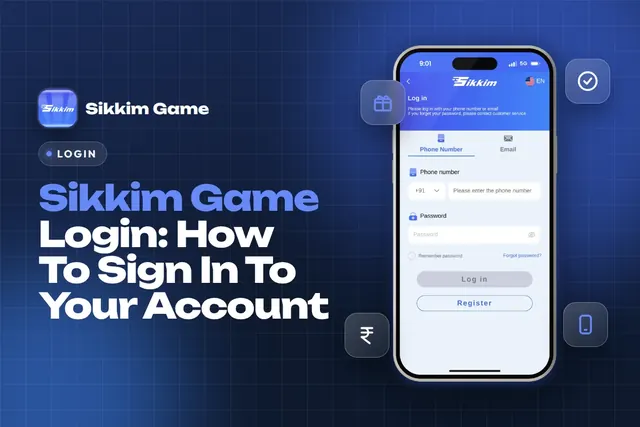
Sikkim Game login steps for India: sign in with your +91 phone number or email, fix a forgotten password, change it safely and keep your account secure.

Sikkim Game bonus offers explained: 3% UPI and 2% USDT deposit bonus, invitation rewards, gift codes, daily tasks, rebate, jackpot and how to claim each.
Ready To Play On Sikkim Game?
Register on Sikkim Game in a minute and explore the games and offers.