
Sikkim Game Customer Care: How To Get Help Fast

Fast Reply
Sikkim Game customer care is a 24/7 support chat that you open from inside your account. It is not a phone line. To reach it, tap Account, then Customer Service, or use 24/7 Customer service under Basic Tools on the homepage.
Most support tickets are about money: a deposit that has not reached your Balance, a withdrawal that is still pending, or a bank account saved with a typo. Support sorts these out much faster when your first message includes the order number and a screenshot. Long back-and-forth chats are what slow things down.
This section covers where to find support inside the app, what details to share with it, how the usual issues get resolved, and how to recognise impostors posing as support staff.
- Support Hours
- 24/7
- Where To Find
- Account > Customer Service
- Forgot Password
- Contact customer service
- Referral Questions
- Agent line customer service
Topics Covered Here
How To Contact Sikkim Game Customer Care
You contact support through the in-app customer service chat, and you get there in a few taps once you are logged in. Use the app or the mobile website you normally play on, and stay logged in to the same account the problem happened on.
The chat has to be opened while you are logged in. That way the agent can link your message to the right account and find your deposit or withdrawal order. If you cannot get in at all, open the Sikkim Game login page first. The forgot password note there also sends you to customer service.
- Log in to your account with your phone number or email and password.
- Tap Account in the bottom menu.
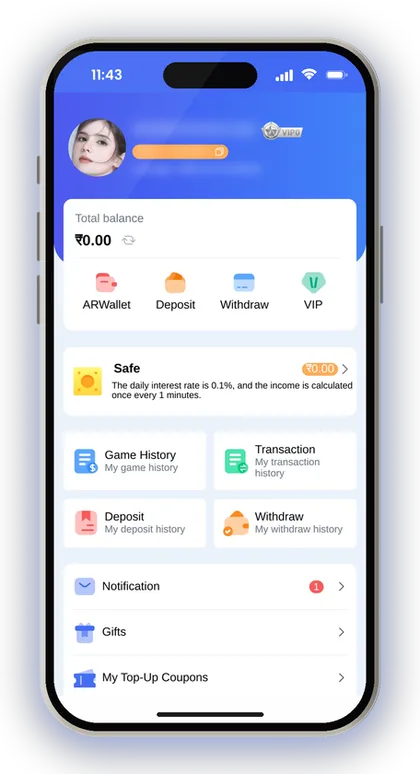
- Scroll down to Service center and tap Customer Service.
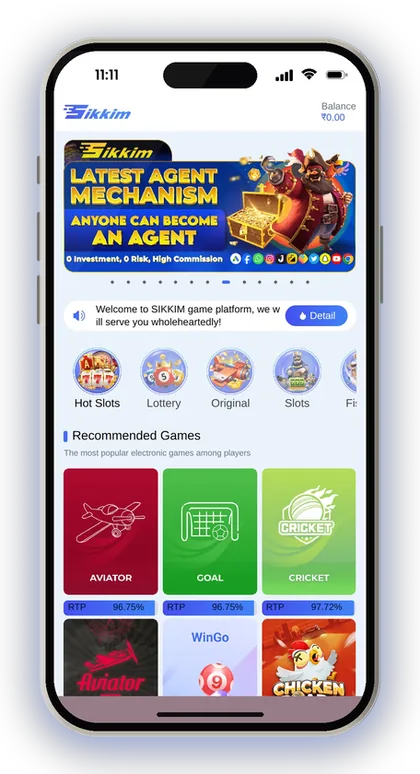
- Or go to the homepage, scroll to Basic Tools and tap 24/7 Customer service.
- Write one clear message: your problem, the order number, the amount and the time.
- Attach a screenshot of the order or the payment receipt, then wait in the chat for a reply.

Player Note: Send all the details in your first message. One complete message usually gets solved faster than five short ones.
Where To Find Sikkim Game Support In The App
Support sits in three places: the Service center block on the Account page, the Basic Tools area on the homepage, and a separate agent line on the Promotion page. Each one suits a different kind of question, so pick the right door before you start typing.
The Account page also holds your Deposit history, Withdraw history and Transaction records. Agents ask for these first, so open them in another tab before you start the chat.
Customer Service Or Feedback: Which One To Use?
Use Customer Service for anything that needs an answer, and Feedback for suggestions. Both sit under Service center on the Account page, but Feedback works more like a comment box than a live chat.
New players often report a missing deposit through Feedback and then wait for hours. If money, login or account safety is involved, always use the chat. Feedback is fine for things like a game that loads slowly or an idea for a new feature.
Agent Line Support For Referral Questions
The Promotion page has its own Agent line customer service for questions about your invitation link, subordinates and commission. That is the right contact if a friend signed up but does not show under Direct subordinates.
Yesterday's commission gets calculated each morning starting at 01:00, so wait until after that before raising a ticket. A lot of referral complaints turn out to be just about timing. If a friend signed up late at night, they will show up in the following day's numbers.
Getting Help Before You Log In
You can still get help before you log in. The homepage shows Basic Tools, including 24/7 Customer service, even before login, and the login screen says to contact customer service if you forget your password.
This matters most when you are locked out, because there is no self-service reset that bypasses support. Have your registered phone number or email ready. The agent needs it to find your account, and a different number will only slow the check.
Is There A Sikkim Game Customer Care Number Or Telegram?
The app does not list a phone number for support. Help is given through the in-app chat. Any number you find on a search result, YouTube comment or WhatsApp forward did not come from your account screen, so treat it with suspicion.
Plenty of players type a customer care number into Google when a withdrawal gets stuck. Scammers know this and post fake numbers on purpose. The safe route is always the Customer Service button inside your logged-in account.
Can You Trust Telegram Channels For Support?
No. A Telegram channel is not a substitute for the in-app chat. Some channels use the Sikkim Game name, post register links and promise signals for the next round. Chatting there does not give anyone access to your account or your orders.
If you are searching for Sikkim Game customer care on Telegram, remember that a channel cannot see your deposit history. Only the logged-in chat can check and fix an order. Game results are random, and no channel can tell you the next colour or number.
How To Spot A Fake Support Agent
Fraudsters posing as support staff tend to reach out to you on their own, request your OTP, or ask for money before agreeing to process your withdrawal. Real support responds only inside a chat you have opened yourself, and the app itself warns you not to hand over OTPs or pay anyone who approaches you in the name of support.
Another warning sign is a link to a different site where you have to log in again. Always reach the app through the Sikkim Game official website link, and never type your password on a page someone sent you in a chat.
What To Send Sikkim Game Support For A Quick Fix
Agents check your issue against your order records, so the more exact your details, the shorter the chat. A message like 'my money did not come' forces them to ask five questions. A full message lets them check it in one go.
Gather these before you open the chat. Most of them come from your Deposit history, Withdraw history or the receipt in your UPI app.
- The phone number or email your account is registered with
- The order number from Deposit history or Withdraw history
- The exact amount and the time you paid or requested it
- The UTR or transaction reference from your UPI app receipt
- For USDT, the Transaction/hash id from your crypto wallet
- A clear screenshot of the order and of the payment receipt
Player Note: Crop out any OTPs or card numbers before you share a screenshot. Support never needs them.
Common Problems And What Customer Care Can Do
Most tickets fall into a few types. Several of them you can avoid by following the on-screen rules. The table matches each common problem with the first thing to check and when to contact support.
Notice the pattern: in most cases the fix starts with your own history pages. That is not support passing the job back to you. It is the fastest way to confirm what actually happened before an agent goes through the records.
| Problem | Check First | When To Contact Support |
|---|---|---|
| UPI deposit not in Balance | Deposit history status and your UPI receipt | Money left your bank but the order is not credited |
| Paid a different amount than the order | Amount on the order vs your receipt | Straight away, with both screenshots |
| USDT deposit missing | Hash id pasted and correct network used | After the transfer shows confirmed in your wallet |
| Withdrawal request blocked | Whether your remaining bet requirement is zero | If it is zero and the request still fails |
| Wrong bank details saved | Name, account number and IFSC | Before you request any withdrawal |
| Forgot login password | Registered phone number or email | Right away, since only support can reset it |
Deposit Issues: When To Ask Customer Care
Most players who reach out to support do so over deposit trouble, and the cause is usually one of three rules shown on screen. The amount you transfer has to match the order you created. Do not cancel the order once you have paid. Once the transfer timer expires, the deposit form needs to be filled in again.
Before your next Sikkim Game deposit by UPI, read the Recharge instructions on that screen. They take thirty seconds and prevent the most painful mistakes.
What To Do If Your Deposit Does Not Show
First check Deposit history. Then contact support with the order number and the UPI reference. Say you add ₹500 by UPI, your bank shows the debit, but your Balance stays the same. That is exactly the case the chat is there for.
Do not create a second order for the same money. Do not cancel the first one either, because cancelling after payment is the move the app warns against. Keep the receipt, wait in the chat, and let the agent match your payment to the order.
Paid The Wrong Amount: Can Support Fix It?
Contact support straight away. Be aware, though, that the deposit rules state the company is not responsible for money lost by transferring the wrong amount. If you send ₹1,050 against a ₹1,000 order, the system may fail to credit it automatically.
Send screenshots of the order and your receipt together so the gap is easy to see. To avoid this in future, type the amount yourself instead of picking a saved one in your UPI app. Re-check it before you enter your UPI PIN.
Player Note: For USDT, paste the Transaction/hash id into the field on the deposit screen. Without it, support has to trace the transfer by hand.
Withdrawal And Bank Account Help
Withdrawal tickets usually come down to two things: a bet requirement that is not finished, or bank details saved wrongly. The Beginner's Guide says your total remaining bet must be zero before you withdraw, and the withdrawal screen tells you to re-check your bank details first.
Limits, daily counts and timings for each method are on the Sikkim Game withdrawal page. Check them before you assume something is broken. Hitting the daily withdrawal count is not a fault support can override.
Why Is My Withdrawal Not Going Through?
The usual reason is that your bet requirement has not reached zero yet. Deposits and some bonuses come with a turnover you must bet through before the money can be withdrawn, and the Withdraw button will not work until that is done.
Look at the requirement shown on the withdraw screen before you open a chat. If it reads zero, your amount is within the range and you still cannot withdraw, send support the exact error message as a screenshot.
Saved The Wrong Bank Name Or IFSC?
Get in touch with customer service before submitting a withdrawal request. If the bank details saved in your account are wrong, the withdrawal screen advises this, and it adds that the company takes no responsibility for losses caused by incorrect details.
Be extra careful with the name field. The first account you add locks the recipient name, and every later method must use the same name. Type it exactly as it appears on your bank passbook, then re-check the IFSC before you tap Save.
USDT Withdrawal Still Not In Your Wallet
A USDT withdrawal has to be confirmed three times on the blockchain main network before it reaches your wallet. A short wait after the request is normal and does not need a ticket.
Check that the TRC address you saved is correct and that your wallet accepts that network. If the confirmations are done and the funds still have not arrived, send support the order number and your wallet address.
Login, Password And Registration Help
If you forget your password, contact customer service, because the login page sends forgotten-password cases there. Do this from the same device and network you normally use. Have your registered phone number or email ready for the check.
If you can still log in, you can change your password yourself: tap Account, then Settings, then Login Password. Enter your current password, set a strong new one, confirm it and tap Save Changes. Do this right away if anyone else may have seen your password.
Cannot Register Without A Sikkim Game Invite Code?
That is how the form works. Invite code is a required field, and registration will not go through without it. Enter 532312088217 in the Invite code field, set and confirm your password, and tick the Privacy Agreement box.
Registration usually fails because of a stray space, a missing digit in the code, or an agreement box that was left unticked. Copy 532312088217 exactly as it appears. Begin from the Sikkim Game register page and get in touch with support only if the form keeps showing an error.
App Not Opening Or Showing Old Screens
Install the latest version before you contact support. Old installs often cause blank screens or failed logins. Get the current build from the Sikkim Game app download page, or use Add to Desktop from the mobile website.
Avoid APK files shared in groups, because you cannot check what is inside them. If the latest Sikkim Game App still will not open, tell support your phone model and Android version. Include a screenshot of the error too.
Staying Safe When You Contact Support
Real support staff never ask for your OTP or UPI PIN, and they never ask for money to free up your funds. The Add UPI screen is clear on this: do not share OTPs, do not pay anyone who contacts you uninvited as support, and do not use your phone number as your UPI ID.
Decide on a spending limit before you play, and stick to money you can afford to lose. Only people above 18 may take part, and the platform itself warns that gambling can turn into an addiction. Rules on real-money gaming differ from one Indian state to another, so check what holds in your own state.
Is There Any Sikkim Game Hack Support Can Share?
No. Sikkim Game Hack tools do not exist, and no agent, Telegram admin or app can change round results. Win Go, K3 and 5D outcomes are random, and anyone selling a way to beat them is running a scam.
These offers usually ask for a 'registration fee' or your login details, and then the money or the account is gone. If someone claiming to be support offers such a tool, stop the chat, change your password and report it through Customer Service.
Player Note: Change your login password every few months and never save it in a shared phone's notes app.
Got Questions? Read Here
Is Sikkim Game customer care available 24/7?
Yes. The homepage lists 24/7 Customer service under Basic Tools, and you can also open the chat from Account > Customer Service. During busy times replies may be slower, so send all your details in the first message.
What is the Sikkim Game customer care number?
The app does not list a phone number for support. Help comes through the in-app chat. Treat any number found on search results or social media as a possible scam.
Does Sikkim Game support work through Telegram?
Telegram channels cannot see or fix your deposit or withdrawal orders. Use the Customer Service chat inside your logged-in account, and never share your password or OTP with a Telegram contact.
What should I do if I forget my login password?
Contact customer service. The login page sends forgotten-password cases there. Keep your registered phone number or email ready so the agent can find your account.
My UPI deposit was debited but not credited. What now?
Check Deposit history first. Then open the support chat with the order number, the amount, the time and your UPI receipt. Do not cancel the order or pay again for the same deposit.
Can support change the name on my bank account?
The first account you add locks the recipient name, and later methods must use the same name. If you made a mistake, contact customer service before you request any withdrawal and explain what needs correcting.
Do I need an invite code to register?
Yes. Invite code is a required field on the register form. Enter 532312088217, set your password, agree to the Privacy Agreement and tap Register.
Next Pages To Open
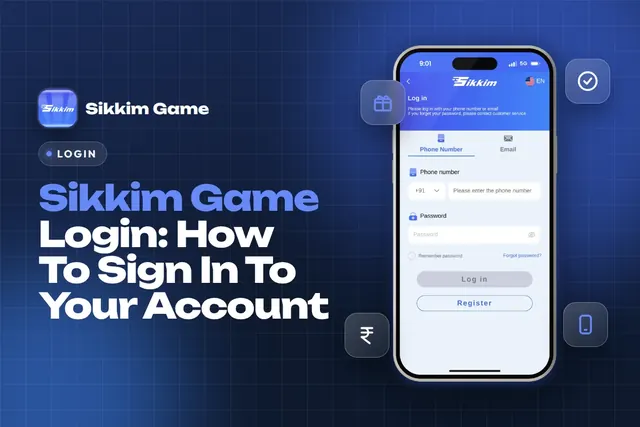
Sikkim Game login steps for India: sign in with your +91 phone number or email, fix a forgotten password, change it safely and keep your account secure.

Sikkim Game deposit steps for UPI, USDT and ARPay, the ₹100 minimum, deposit bonus rates, and how to fix a recharge that does not show in your balance.
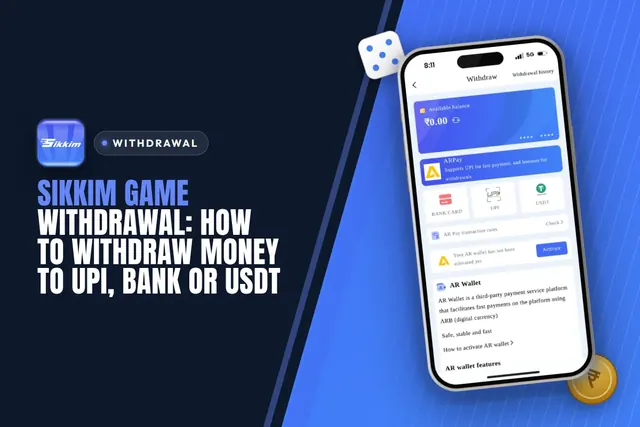
Sikkim Game withdrawal steps for UPI, bank card and USDT, with the ₹110 minimum, daily limits, the betting rule and fixes for stuck or rejected requests.
Sikkim Game app download for Android and iPhone: install steps, Quick vs Complete Installation, invite code 532312088217, login tips, fake APK warnings.
Ready To Play On Sikkim Game?
Register on Sikkim Game in a minute and explore the games and offers.