
Sikkim Game Deposit: How To Add Money By UPI, USDT And ARPay

Fast Reply
A Sikkim Game deposit starts from ₹100 by UPI, and you can also add money with USDT or through ARPay. You open Wallet, tap Deposit, pick a method, enter the amount and then pay the exact order amount from your UPI app or crypto wallet.
Most failed recharges are not technical faults. They happen when the player pays a different amount from the order, cancels the order after paying, or lets the payment timer run out. Avoid those three mistakes and the money usually reaches your balance without you ever needing to contact support.
The method also changes how much extra you get. UPI deposits carry a 3% bonus, USDT deposits 2% and ARPay 3%, so on a ₹1,000 UPI deposit you would see ₹30 added on top.
- Minimum Deposit
- ₹100 by UPI
- UPI Range
- ₹100 to ₹50,000
- USDT Minimum
- 10 USDT
- Payment Methods
- UPI, USDT, ARPay
- Deposit Bonus
- 3% UPI, 2% USDT
- Where To Deposit
- Wallet, then Deposit
Topics Covered Here
How To Deposit Money On Sikkim Game?
You deposit from the Wallet tab in the bottom menu: tap Wallet, then Deposit, choose UPI, USDT or ARPay, enter the amount and complete the payment. The same Deposit button sits on the Account page and at the top of game screens such as Win Go and K3, so you can add money between rounds without going back to the homepage.
Every deposit creates an order with a fixed amount and a time limit. Think of it as a bill. The app matches your transfer to that order, so the order details decide whether the money is credited, not what your bank app says.
If you are signed out, start from the Sikkim Game login page and log in with your phone number or email. The steps are the same on the Sikkim Game app and on the mobile website.
- Log in with your phone number or email and your password.
- Tap Wallet in the bottom menu, then tap Deposit.
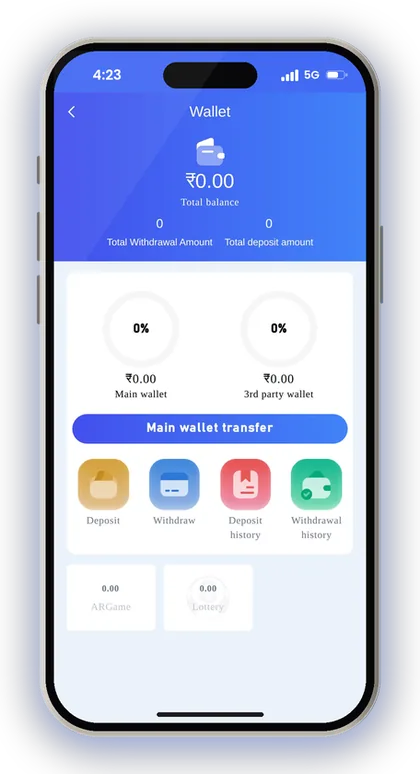
- Choose your method: UPI, USDT or ARPay.
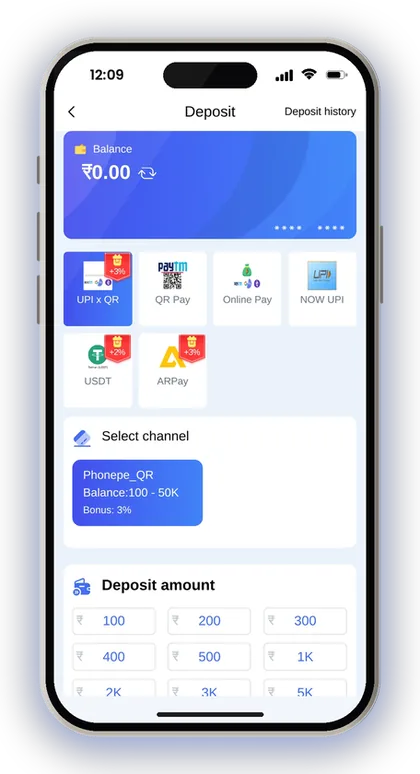
- Pick a channel and check its amount range and bonus rate.
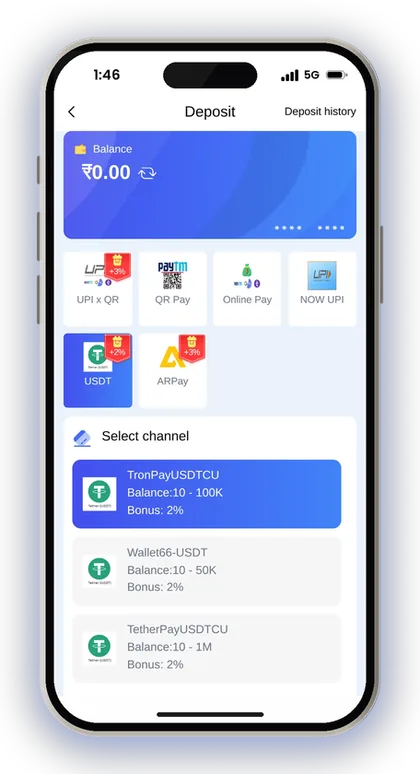
- Enter the deposit amount and tap Deposit to create the order.
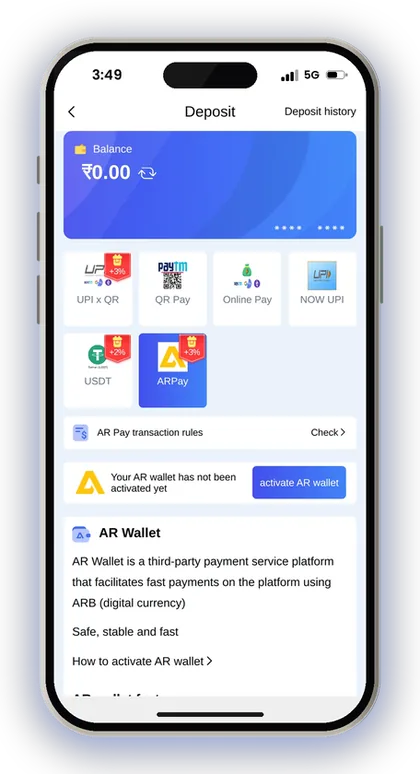
- Pay exactly that amount in your UPI app or crypto wallet before the timer ends.
- Keep the order open, then check Deposit history to confirm the credit.
Player Note: Before you tap Deposit, note the exact order amount, including any paise, so you can type the same figure in your UPI app.
What You Need Before Your First Sikkim Game Recharge
You need a registered, logged-in account before the Deposit button will work. Registration asks for a phone number, a password and an invite code, and the invite code is a required field. Enter 532312088217 in the Invite Code box when you create your Sikkim Game account, then log in and go to Wallet.
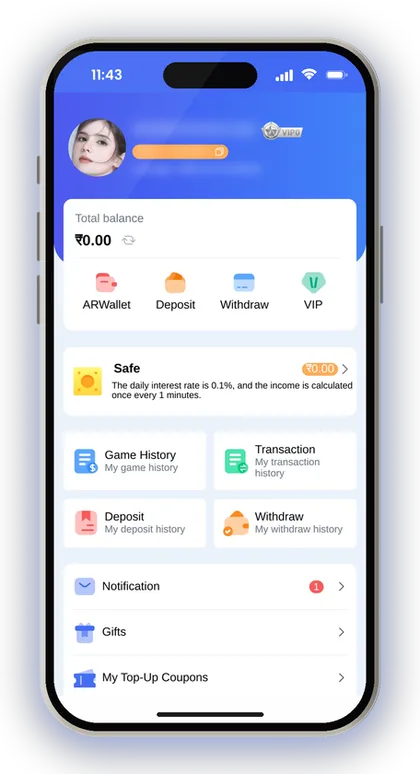
Think about how you will withdraw while you are still depositing. Whichever bank account you save first fixes the recipient name, and all withdrawal methods after that have to carry the same name. When you deposit through your own UPI account and later withdraw to a bank account held in that name, support can quickly track any payment that goes wrong.
New players often deposit first and only find these rules when they try to withdraw. Five minutes of setup now saves days of back-and-forth later.
- An account registered with the Sikkim Game invite code 532312088217
- Your login password saved somewhere safe, because a forgotten password needs customer service
- A UPI app such as PhonePe, Google Pay or Paytm with enough balance, or a USDT wallet
- At least ₹100 for a UPI deposit, or at least 10 USDT for a crypto deposit
- A steady mobile data or Wi-Fi connection so the order does not expire mid-payment
- Your real name ready for the bank account or UPI you will add later
Player Note: Write down your password before you make your first deposit, because resetting it means waiting for customer service.
Sikkim Game Deposit Methods, Limits And Bonus Rates
The deposit screen offers three methods: UPI, USDT and ARPay. UPI works with any UPI app, USDT is the crypto option, and ARPay runs through a separate AR Wallet that you activate first. Each method shows its own amount range and bonus rate on the tile, and the channels inside a method can differ slightly.
The table below shows the ranges on the main deposit screen. Limits can change, so read the range under the channel you pick before you type an amount.
| Method | Minimum | Maximum | Deposit Bonus |
|---|---|---|---|
| UPI | ₹100 | ₹50,000 | 3% |
| USDT | 10 USDT | Varies by channel | 2% |
| ARPay | Check the ARPay screen | Check the ARPay screen | 3% |
UPI Vs USDT Deposit: Which Should You Use?
UPI suits most players because it is quick, works in rupees and pays the higher 3% bonus. You scan or pay, and the order matches the rupee amount directly.
USDT makes sense if you already hold crypto or want to move larger sums, since some USDT channels go far above the ₹50,000 UPI ceiling. The trade-off is network choice and a lower 2% bonus. A wrong network or address cannot be fixed, so beginners should start with UPI.
What Is The Sikkim Game Minimum Deposit?
The lowest deposit is ₹100 through UPI. For USDT, the deposit screen sets the minimum at 10 USDT, and anything below that is not credited.
Starting small is a sensible way to test the process. Send ₹100, confirm it lands in your balance and check that the 3% bonus appears. Then you know the channel works before you send a bigger amount. For ARPay, check the ARPay screen for the current minimum.
Player Note: If you plan to deposit more than ₹50,000 at once, split it into two UPI orders rather than forcing one oversized payment.
How To Make A Sikkim Game Deposit By UPI
A UPI deposit works like paying a shop QR code. Choose UPI on the deposit screen, enter an amount between ₹100 and ₹50,000, tap Deposit and pay the order from PhonePe, Google Pay, Paytm or any other UPI app. Once the payment matches the order, the balance updates with the 3% bonus added.
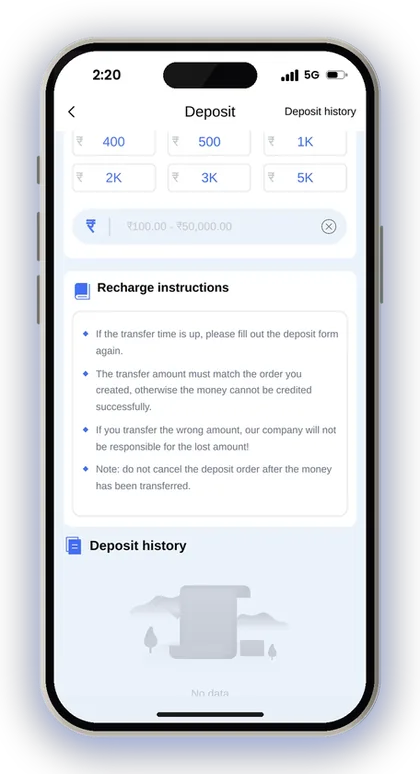
The recharge instructions on the screen set out the rules: the transfer must match the order amount, you must not cancel the order after paying, and if time runs out you must create a new order. Each rule exists because the system matches payments to orders automatically.
Why Must The Transfer Amount Match The Order?
A payment is credited only when its amount is the same as the order you placed. Suppose you place an order for ₹500 but pay ₹550. The two will not match, and the platform takes no responsibility for money lost because of an incorrect amount.
The usual mistake is rounding. Some orders show an odd figure, and players type a round number out of habit. Copy the amount exactly, check it once more on the UPI confirm screen, and only then enter your UPI PIN.
What If The Payment Timer Runs Out?
If the transfer time runs out, fill in the deposit form again and create a fresh order. Do not pay against an expired order, because the system may no longer be waiting for that payment.
Say you open the order, switch to your UPI app, and a bank OTP or slow network holds you up for several minutes. Go back, check whether the timer is still running, and if it has ended, start again with a new order rather than paying the old one.
Can You Cancel A UPI Deposit Order?
You can leave an order you have not paid, but never cancel one after the money has left your bank. The app warns against this directly, because a cancelled order has nothing left to match your payment.
Players often panic when the balance does not change within a minute and tap cancel. That turns a short delay into a support ticket. Leave the order open and check Deposit history first.
Player Note: Pay from the same phone you play on, so you can see both the order and the UPI app side by side.
How To Deposit USDT On Sikkim Game
To deposit USDT, select USDT on the deposit screen, choose a channel, set the USDT amount and tap Deposit to get a deposit address. You then send USDT from your own crypto wallet to that address, paste the transaction hash and tap Complete recharge. The minimum is 10 USDT, and each channel shows its own upper range.
The address screen accepts USDT only. Sending any other coin or token to that address means it cannot be recovered, and crypto transfers cannot be reversed by a bank or by customer care.
- Tap Wallet, then Deposit, and select USDT.
- Choose a channel and check its range and 2% bonus.
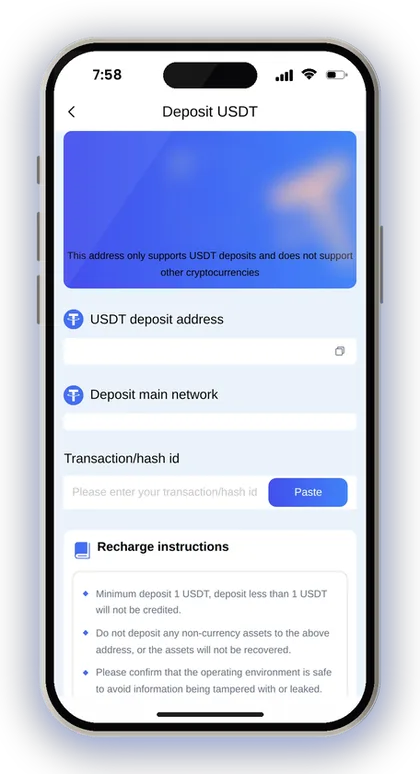
- Set the USDT amount, at least 10 USDT, and tap Deposit.
- Copy the USDT deposit address and note the main network shown.
- Send USDT from your wallet on that same network.
- Paste the transaction hash and tap Complete recharge.
Which Network Should You Send USDT On?
Send on the exact main network shown on the deposit address screen, and nothing else. USDT runs on several blockchains, and the same token sent on the wrong one will not reach the platform's wallet.
In your crypto wallet or exchange, the withdraw screen asks you to pick a network. That choice matters more than anything else in a crypto deposit. Compare the network name on both screens before you confirm, and copy the address with the copy button instead of typing it.
Why Paste The Transaction Hash?
Your proof that a transfer went through on the blockchain is the transaction hash, which is also known as the TxID. When you paste it in the Transaction/hash id field, the platform can locate your payment and link it to your order.
You find the hash in your wallet's transaction details once the transfer is sent. Keep a copy in your notes. If the credit is ever delayed, that hash is the first thing support will ask for.
Player Note: Use a safe, private device for crypto deposits; the screen itself warns that an unsafe environment can let address details be changed or leaked.
Adding Money Through ARPay And AR Wallet
ARPay deposits pass through AR Wallet, a third-party payment service that runs on a digital currency called ARB. You must activate your AR Wallet before using it. Once that is done, the app says an AR Pay recharge reaches your account in about 5 seconds. Just like UPI, ARPay deposits also get a 3% bonus.
The ARPay tile has a Check link for the AR Pay transaction rules and a guide on how to activate the wallet. Read the transaction rules before your first purchase, because buying and selling ARB adds a step that UPI does not have.
How Does ARPay Recharge Work?
You buy ARB in the AR Wallet with rupees, then use it to recharge your game balance. When you want your money back, you can send your balance to AR Wallet and sell ARB through UPI to get rupees.
The advantage the app describes is fewer bank-side problems. Your bank sees AR Wallet transactions instead of repeated gaming deposits, so you deal less with daily bank limits. The Activity page also lists a 5% bonus for buying and selling ARB through AR Wallet.
Is ARPay Worth Setting Up?
ARPay is worth it if you deposit often and your bank keeps flagging or limiting UPI payments. For a one-time ₹100 or ₹200 deposit, plain UPI is simpler and gives the same 3% bonus.
The main cost is an extra app and an extra conversion step. Activate the wallet when you have time to read the rules calmly, not halfway through a game when you are rushing to add money.
Player Note: Activate AR Wallet before you need it, so a slow setup never stands between you and a deposit.
Deposit Not Showing In Your Balance? How To Fix It
If your balance has not updated, first open Deposit history from the deposit screen or from the Account page and check the status of the order. Most delays come from a mismatched amount, an expired order or a slow bank confirmation, not from lost money.
Say you deposit ₹500 by UPI, your bank shows the money as debited, but the balance still reads the old figure. Do not create a second order straight away and do not cancel the first. Check the order status, confirm the amount you sent matches the order, and give the bank a few minutes to confirm.
Where To Check Your Deposit History
Deposit history sits on the deposit screen and in the Account page under My deposit history. The Wallet page also shows your total deposit amount, which helps you check the full figure over time.
Look for the order matching your amount and time. If it is there and still pending, your payment is probably being processed. If it is missing, you may have paid against an expired order, and you will need the UPI reference number to trace it.
When To Contact Customer Care
Contact support if the order stays pending long after your bank confirmed the debit, or if you paid the wrong amount. The app offers 24/7 customer service from the Account page and the homepage.
Send the order details, the amount, the time of payment and the UPI reference number or USDT transaction hash in your first message. Clear details get a faster answer. See Sikkim Game customer care contacts for the support options.
Is The Money In Your Main Wallet Or 3rd Party Wallet?
The Wallet page splits your money into a main wallet and a 3rd party wallet, with a Main wallet transfer option. A deposit lands in the main wallet, while some third-party games use their own wallet balance.
If a slot or casino game shows less than you expect, the money may still be sitting in the main wallet. Check the Wallet page before assuming a deposit failed.
Player Note: Once a deposit goes through, capture the UPI confirmation screen with its transaction number and keep that image saved.
Deposit Bonuses And Recharge Offers On Sikkim Game
Apart from the rate on each method, the Activity page runs offers tied to deposits. The most direct one is the 7th-17th-27th recharge bonus of 5%, so timing a planned deposit for one of those dates gets you more than an ordinary day would. Read each offer's rules in the app before you count on it.
Bonus money is still playing money, and offers often come with betting targets attached. Deposit what you planned to deposit anyway, then take the bonus as a little extra. Do not deposit more than you planned just to reach an offer tier. Full details sit on the Sikkim Game bonus offers page.
- 7th, 17th and 27th of the month: 5% recharge bonus
- Daily missions for lottery and slots: deposit targets of 500, 1,500 and 3,000 with bet targets of 5,000, 15,000 and 30,000; daily rewards do not carry over to the next day
- Gift codes: cash is credited directly, while coupons go to your coupons list and have a spending threshold and an expiry date
- Wheel spin: open to members whose single or total deposits reach the set amount, with a bank card already bound
- Invitation bonus: paid when invited friends register and each meets the recharge requirement
Player Note: Check your coupons list before a deposit; an unused recharge coupon that expires is money left behind.
Safe Deposit Habits And Mistakes To Avoid
To keep your deposit safe, pay only from the Deposit page inside your own account. Never pay a UPI ID or QR code that someone sends you in a chat. Real support agents will not request your OTP or ask for money to be sent to a personal number. The UPI setup screen also warns you against revealing OTPs or paying anyone who reaches out pretending to be support.
Remember what happens to money after you deposit it. Before any withdrawal, the app requires your remaining bet amount to reach zero, so treat every deposit as money you will play with, not money you are storing. Read the rules for a Sikkim Game withdrawal request before your first large deposit.
- Paying a rounded amount instead of the exact order amount
- Cancelling an order once your bank has already debited the money
- Paying against an expired order instead of creating a new one
- Sending USDT on a different network from the one shown
- Using your phone number as your UPI ID, which the app flags as a fraud risk
- Depositing through links or QR codes shared in chats
Is There A Sikkim Game Hack For Free Balance?
No. There is no Sikkim Game Hack that adds balance, doubles deposits or predicts results, and anyone selling one is running a scam. Game results are random, and no app, Telegram group or paid tool changes that.
These scams usually end the same way: you pay a fee or deposit to their UPI ID, and then they stop replying. Some also ask for your login details and empty your account. Never share your password, and never deposit anywhere except your own Deposit page.
Keep Deposits Inside Your Playing Budget
Fix a playing budget for the month before you go to the Deposit page, and quit once you have spent it. Only players who are 18 or older are accepted on the platform, and it warns that gambling can become addictive, so it should be played sensibly.
The common trap is chasing losses with quick top-up deposits after a bad run. Fast UPI payments make this easy. If you catch yourself making a third deposit in one evening, close the app and come back another day.
Player Note: Set a fixed deposit amount for each week and do not change it in the middle of a game.
Got Questions? Read Here
What is the minimum deposit on Sikkim Game?
The minimum is ₹100 through UPI. For USDT, the deposit screen sets a minimum of 10 USDT, and smaller amounts are not credited. For ARPay, check the ARPay screen for the current limit.
How much can I deposit by UPI at once?
On the deposit screen, UPI amounts can range from ₹100 up to ₹50,000. To add a larger sum, place another order instead of paying beyond that limit. USDT channels accept bigger amounts, and every channel displays its own limits.
Do I get a bonus when I deposit?
Yes. UPI and ARPay deposits show a 3% bonus and USDT deposits a 2% bonus on the deposit screen. The Activity page also runs a 5% recharge bonus on the 7th, 17th and 27th of the month.
My money was debited but the balance did not update. What should I do?
Do not cancel the order or make a new deposit straight away. Check Deposit history for the order status and confirm that you paid the exact order amount. If it stays pending, send the order details and your UPI reference number to 24/7 customer service.
What happens if I transfer the wrong amount?
As your payment cannot be tied to your order, it will not get credited automatically. The platform says it accepts no responsibility for funds lost because the transferred amount was wrong. Contact customer service right away and send your payment proof.
Do I need an invite code to deposit?
Depositing needs a registered account, and signing up needs an invite code. Put 532312088217 in the Invite Code field while registering, then log in and open Wallet to make your first deposit.
Can I deposit without leaving a game?
Yes. Game screens such as Win Go, K3, 5D and Trx Win Go have a Deposit button at the top. It opens the same deposit screen, so the same amount and order rules apply.
Next Pages To Open
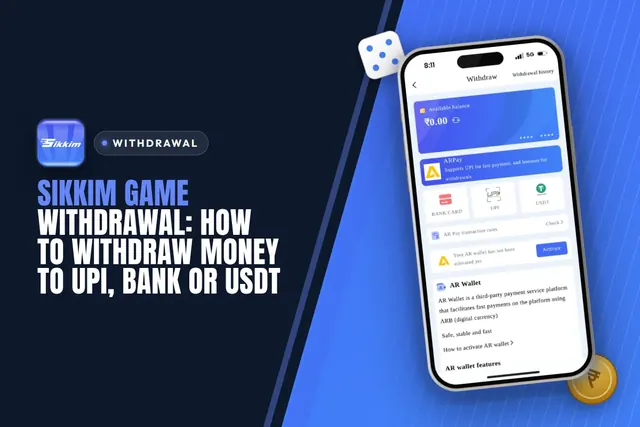
Sikkim Game withdrawal steps for UPI, bank card and USDT, with the ₹110 minimum, daily limits, the betting rule and fixes for stuck or rejected requests.

Sikkim Game bonus offers explained: 3% UPI and 2% USDT deposit bonus, invitation rewards, gift codes, daily tasks, rebate, jackpot and how to claim each.
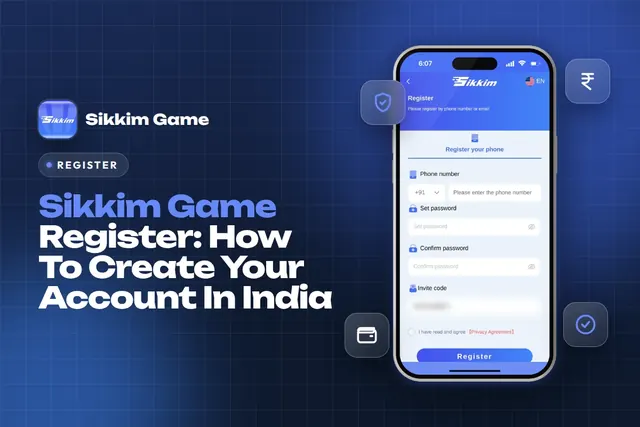
Sikkim Game register steps for India: phone or email, password, invite code 532312088217, common sign-up errors and what to do right after you join.

Sikkim Game customer care is open 24/7 inside the app. Learn where to find it, what details to send, and how to fix deposit, withdrawal and login issues.
Ready To Play On Sikkim Game?
Register on Sikkim Game in a minute and explore the games and offers.