
Sikkim Game USDT Deposit: How To Add Money With USDT (TRC20)
Fast Reply
A Sikkim Game USDT deposit works like this: open Deposit, tap the USDT tile, pick one of three channels, enter at least 10 USDT and send the coins to the address shown. Then paste the transaction hash and tap Complete recharge. Each USDT channel also adds a 2% bonus to your deposit.
Most failed crypto deposits come from a few small slips, not from anything technical. Someone sends the wrong coin, picks the wrong network or sends less than the minimum. Below you will find each step in order, plus the checks experienced players do before they hit Send in their wallet.
- Minimum Deposit
- 10 USDT
- USDT Bonus
- 2% extra
- Network
- TRC (TRON)
- USDT Channels
- Three channels
- Highest Channel Limit
- Up to 1M USDT
- Accepted Coin
- USDT only
Topics Covered Here
What You Need Before A Sikkim Game Crypto Deposit
To make a crypto deposit you need a Sikkim Game account, some USDT in a wallet or exchange that can send on the TRON (TRC) network, and a few minutes when you are not in a hurry. Sort these out first. A deposit that stops halfway is much harder to fix than one you never started.
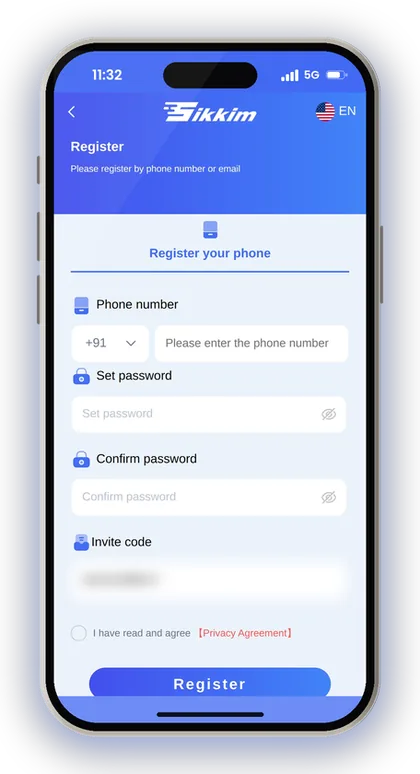
You can't open an account without an invite code, because the Register form makes it a required field. Enter 532312088217 in the Invite Code field when you sign up. If you have not made your account yet, the Sikkim Game invite code register steps go through every field on the form.
Many new players skip one check: whether their wallet has a small amount of TRX. On the TRON network the sending fee is normally paid in TRX, not in USDT. If you have 0 TRX, your exchange or wallet may refuse to send or show an error. That is a wallet problem, not a problem with the Sikkim Game App.
- A registered account (Invite Code 532312088217 entered at sign-up)
- Logged in on the app or the mobile website
- At least 10 USDT ready to send
- A wallet or exchange that sends USDT on the TRC (TRON) network
- A little TRX in that wallet for the network fee
Player Note: Send a small test amount (just above 10 USDT) the first time you use a new wallet. Move larger sums only after you have watched that one reach your Balance.
Sikkim Game USDT Deposit Channels And Limits
Tap the USDT tile on the Deposit page and you get three channels: TronPayUSDTCU, Wallet66-USDT and TetherPayUSDTCU. All three start at 10 USDT and add a 2% bonus. The only real difference is the highest amount each one takes in a single deposit.
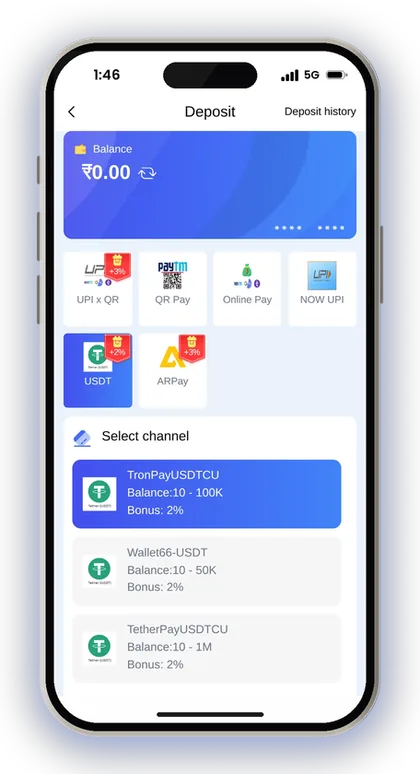
This minimum and range come from the USDT tile on the main Deposit page, and that is the number to go by. If you see a different figure on another screen, ignore it and stay at 10 USDT or above.
| Channel | Deposit Range | Bonus |
|---|---|---|
| TronPayUSDTCU | 10 - 100K USDT | 2% |
| Wallet66-USDT | 10 - 50K USDT | 2% |
| TetherPayUSDTCU | 10 - 1M USDT | 2% |
Which USDT Channel Should You Pick?
For normal amounts any of the three will do, since they share the same minimum and the same 2% bonus. The maximum only matters for large deposits. TetherPayUSDTCU goes up to 1M USDT, TronPayUSDTCU to 100K and Wallet66-USDT to 50K.
Choose your channel first and only then copy the address. Don't switch channels after you have sent coins, because each order is tied to the channel and address it was created with.
What If One Channel Does Not Load?
Payment channels sometimes go slow or stop responding for a while. That is normal on apps like this, and it is the reason there are three. If one channel will not create an order, go back and try a different one before you send anything.
The rule that matters is this: never send USDT to an address from an order that failed to load properly. Wait until you see a complete address screen with the network shown, then make the transfer.
How To Make A USDT TRC20 Deposit Step By Step
A USDT TRC20 deposit has two halves. You create the order inside Sikkim Game, then you send the coins from your own wallet. Keep both apps open, because you will move between them to copy the address and then the transaction hash.
The amount screen has a quick button such as 10K. You can also type your own figure, as long as it fits the channel's range. Type the amount yourself rather than tapping a preset you did not mean to choose. A wrong amount is one of the most common reasons deposits get delayed.
- Do your Sikkim Game login and tap Wallet, then Deposit.
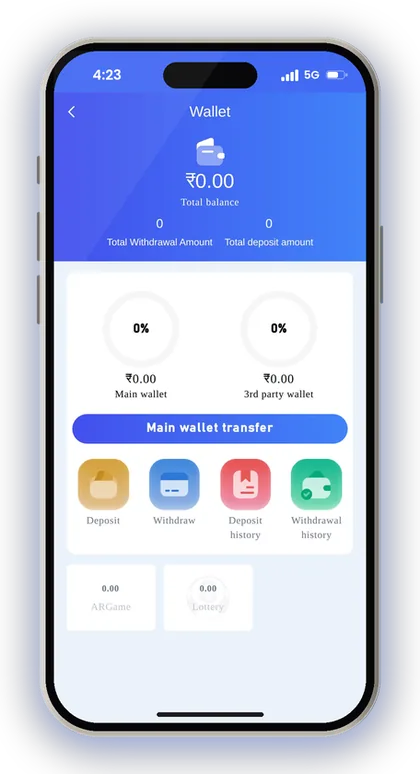
- Tap the USDT tile (marked +2%).
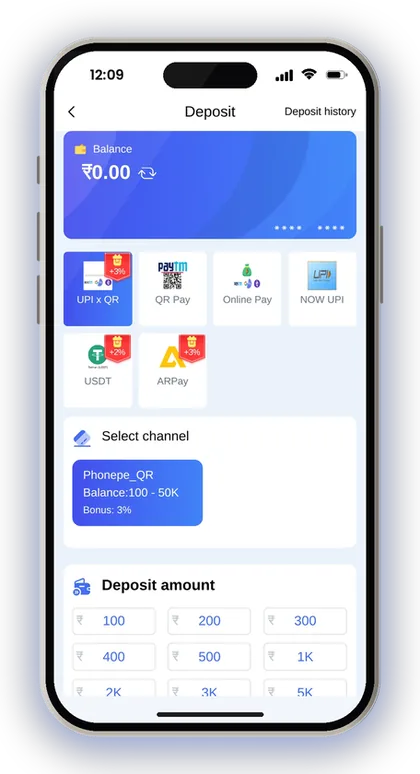
- Choose a channel: TronPayUSDTCU, Wallet66-USDT or TetherPayUSDTCU.
- Enter or select the amount of USDT, at least 10 USDT.
- Tap Deposit to open the USDT deposit address screen.
- Check the deposit main network, then copy the USDT deposit address.
- In your wallet or exchange, send USDT on the TRC (TRON) network to that address.
- Copy the transaction hash from your wallet and paste it into the Transaction/hash id box.
- Tap Complete recharge and watch your Balance and Deposit history.
Player Note: Leave the order open until you have sent the coins and pasted the hash. Closing it halfway and making a new one is how people end up with two orders and one payment.
How To Copy The Deposit Address And Network Correctly
Always use the copy button to copy the address. Never type it by hand or copy it from an old chat or screenshot. A crypto address is a long string of letters and numbers, and one wrong character sends your USDT to a stranger with no way to get it back.
The screen also shows the deposit main network. On Sikkim Game the USDT address you save for withdrawals uses TRC, so on the sending side you choose TRON or TRC20 in your exchange.
Why Does The TRC20 Network Matter?
USDT runs on several blockchains, and an exchange will usually ask you to pick one when you send. If you pick a different network from the one on the deposit screen, the coins may never reach the platform's address, even though the address text looks right.
Before you confirm in your exchange, read the network name one more time. Look for TRON, TRC20 or TRC. Many players lose money here because the exchange quietly fills in a different network from their last transfer.
How To Check A Pasted Address Is Right
Once you paste the address into your wallet, compare the first four and last four characters with the deposit screen. It takes ten seconds and catches most copy mistakes, including clipboard malware that swaps addresses on infected phones.
Also check that the address field holds the address and nothing more. A space added by accident, or a line of text pasted with it, can make the wallet reject the transfer or behave strangely.
Pasting The Transaction Hash And Completing The Recharge
The transaction hash, also called the TXID, is the receipt your wallet gives you for the transfer. Sikkim Game has a Transaction/hash id box with a Paste button on the deposit screen. Fill it in, then tap Complete recharge so the order is linked to your actual payment.
Many players transfer the coins, shut the app and assume the funds will be credited on their own. Always paste the hash. Should you need to open a ticket later, that hash is the single proof that resolves the matter.
Where Do You Find The Transaction Hash?
In an exchange app, open your withdrawal history and tap the USDT transfer you just made. The TXID or hash is listed there with a copy icon. In a personal wallet, open the transaction details on the activity or history screen.
The hash is a long string, much longer than an address. If what you copied is short, or looks like your own wallet address, you have copied the wrong field. Go back and look for the line marked TXID or Hash.
What If The USDT Does Not Show In Your Balance?
Say you send 50 USDT, paste the hash, and ten minutes later your Balance has not moved. First, search the hash on a TRON block explorer and check that it shows as confirmed and sent to the right address. If the network still shows it as pending, all you can do is wait.
If the explorer shows it confirmed and your Deposit history still shows nothing, contact Customer Care with the hash, the amount and the channel name. Do not create a second order and send again, because that only doubles the problem.
Player Note: Take a screenshot of the completed transfer in your wallet, showing the amount, network and hash, before you leave the screen.
Why Other Coins Sent To The USDT Address Are Lost
Only USDT can be deposited to this address. A message on the screen clearly states that other cryptocurrencies are unsupported and that any non-currency assets sent here cannot be recovered. TRX, BTC, an NFT or some other token might land at the address on the blockchain, yet the platform will not add it to your balance.
This happens more than you might expect. A wallet that holds both TRX and USDT on TRON shows both in one list, and in a rush it is easy to tap the wrong one. Before you confirm, look at the coin name on the final send screen as well as the amount.
The same goes for amounts under the minimum. A transfer below 10 USDT is not credited, so after the network fee the amount that arrives must still be 10 USDT or more. Some exchanges take their fee out of the amount you type, so send a little extra if yours does that.
Player Note: If your exchange deducts the fee from the amount sent, add a small buffer so that at least 10 USDT actually arrives.
The Extra 2% Bonus On A Sikkim Game USDT Deposit
All three USDT channels add a 2% bonus. On a 100 USDT deposit that is 2 USDT extra, and on 1,000 USDT it is 20 USDT. The percentage is the same whichever of the three channels you use.
Before you treat any bonus as free money, look at what it needs from you. Bonus balances on apps like this usually come with conditions before you can withdraw them. Check the rules on the Activity page, and read the full list of Sikkim Game bonus offers before you decide which method suits you.
USDT Vs UPI: Which Gives A Better Deposit Bonus?
Going by bonus alone, UPI comes out ahead: its tile shows +3% against +2% for USDT. On ₹10,000 that gap is ₹100, which is real money but not a reason to change method on its own.
USDT makes sense if you already keep your funds in crypto, or if UPI gives you trouble with bank limits. If you normally pay through PhonePe or Google Pay, the Sikkim Game deposit UPI options are quicker and pay the higher bonus.
Does The Bonus Change Your Real Balance?
The bonus adds to what you can play with. It does not change how the games work or improve your chances in any round. Every Win Go, K3 or slot result is random, with or without a bonus.
A sensible way to use it: count only the money you deposited as your playing budget, and treat the 2% as a small cushion. Players who plan around the bonus tend to deposit more than they meant to.
After Your Deposit: Playing And Withdrawing USDT
Once the USDT shows in your Balance, you can use it on every game section, including the Lottery games such as Win Go and Trx Win Go. Before your first bet on colours or Big/Small, read the Win Go odds explained in plain maths so you know what each bet really pays and how often.
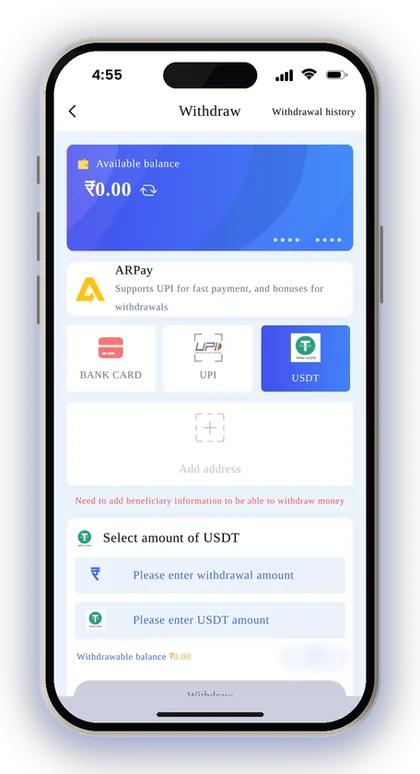
USDT also works for withdrawals, and the range there is ₹1,030 to ₹1,000,000. A USDT withdrawal arrives after three confirmations on the blockchain main network. First you add your TRC USDT address on the withdraw screen. The full rules and other methods are on the Sikkim Game withdrawal limits page.
Before anything else, note what the Beginner's Guide says: the bet requirement still pending must come down to zero before a withdrawal is allowed. Should you deposit and ask for a withdrawal right away without placing any bets, the request could be rejected. Factor this in while choosing your deposit amount.
Player Note: Only those aged 18 or above should use this platform. Deposit just an amount you can afford to lose, decide on a budget before you begin, and stop playing as soon as you reach it.
Common Sikkim Game USDT Deposit Mistakes To Avoid
Nearly every lost or late crypto deposit comes down to one of a few errors, and you can avoid each of them with a quick check. Here they are, so you can tick them off before you send.
One more warning, because it comes up all the time: there is no Sikkim Game Hack. Telegram channels or apps that promise a hack or result predictor in exchange for a USDT payment are scams. Send USDT only to the address on your own deposit screen, never to someone claiming to be support. You can find more payment and safety tips on the Sikkim Game blog.
- Sending on a network other than TRC (TRON)
- Sending a coin other than USDT to the address
- Sending less than 10 USDT after fees
- Typing the address by hand instead of copying it
- Not pasting the transaction hash and closing the order
- Making a second order and paying twice when the first is slow
- Paying an address someone sent you in a chat
Got Questions? Read Here
What is the minimum Sikkim Game USDT deposit?
All three USDT channels have a minimum of 10 USDT, and anything below that is not credited. Remember to allow for exchange fees so that at least 10 USDT actually reaches the address.
Which network should I use to send USDT?
Use TRON, which shows as TRC or TRC20 in most exchanges. Check the deposit main network on the address screen before you send, because picking a different network can mean the coins never arrive.
How much bonus do I get on a USDT deposit?
Every USDT channel adds 2%. UPI deposits show +3%, so UPI pays a little more if the bonus is all you care about.
What happens if I send a different coin to the USDT address?
Only USDT is supported at this address. Any other cryptocurrency or non-currency asset sent to it will be neither credited nor recovered, so confirm the coin name on the last screen of your wallet before sending.
Why do I need to paste the transaction hash?
The hash links your payment to your deposit order. Paste it into the Transaction/hash id box and tap Complete recharge. If anything goes wrong, Customer Care can use it to trace your deposit.
Do I need an invite code to make my first USDT deposit?
You need an account first, and registration on Sikkim Game is not possible without an invite code. Enter 532312088217 in the Invite Code field when you register, then log in and deposit.
Can I withdraw back to USDT?
Yes. Add a TRC USDT address on the withdraw screen. The USDT withdrawal range is ₹1,030 to ₹1,000,000, and funds arrive after three blockchain confirmations.
Next Pages To Open

Sikkim Game deposit steps for UPI, USDT and ARPay, the ₹100 minimum, deposit bonus rates, and how to fix a recharge that does not show in your balance.
Sikkim Game withdrawal steps for UPI, bank card and USDT, with the ₹110 minimum, daily limits, the betting rule and fixes for stuck or rejected requests.

Sikkim Game bonus offers explained: 3% UPI and 2% USDT deposit bonus, invitation rewards, gift codes, daily tasks, rebate, jackpot and how to claim each.

Sikkim Game invite code register steps: sign up with +91 phone or email, set a password, enter code 532312088217, then add a payout account and deposit.
Ready To Play On Sikkim Game?
Register on Sikkim Game in a minute and explore the games and offers.